Gone are the days when creating multimedia to market an event required an enormous investment in software and the time to master it. Following are six examples of low-cost, easy-to-use software applications that could potentially be of great service to planners. These programs, which either reside online or run on mobile devices -- or, in some cases, do both -- can be used to create a variety of multimedia projects. For simple, fun ways to create and share videos, slide shows, podcasts, presentations and photos, read on.
 AnimotoLite version, free; Plus version, $5/month or $30/year; Pro version, $39/month or $249/year; Reseller, $499/year
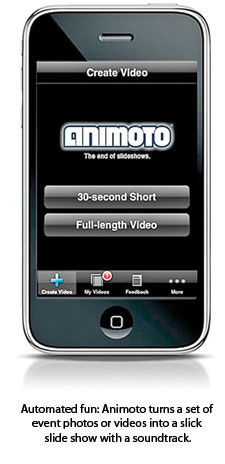
Constructing a slide-show clip doesn't get much easier than with Animoto. You need provide only the photos (and/or video clips), and this online application does the rest, stringing together images in time with a selectable soundtrack, complete with transitions and effects.
The end result is pretty sharp and can be embedded on an event's website or Facebook page to build buzz for the next event. The free version produces 30-second videos, but the paid versions allow for slide shows that last as long as 10 minutes. These paid versions also provide a bit more user control over the final product, with adjustable parameters such as photo-display speed and resolution. With the Pro version you even get the option of removing the Animoto logo (so that no one knows how little you had to work to create the video), as well as adding licensed music from Animoto's soundtrack catalog and creating a live link at the end of the video -- to send viewers directly to the event registration page, for instance. Animoto offers a number of selectable theme templates, which determine the look of the slide show and the nature of the photo effects; the ones available at the Pro level do look a bit more, well, professional.
The nice thing about slide shows, though, is that they needn't always look that professional to be effective. Attendees typically enjoy seeing snapshots of themselves at a meeting or convention that just ended, even if those snapshots aren't of the highest quality. On the other hand, top-notch images combined with a more professional template result in a very different clip, which might do more justice to your event's public image. Animoto is a flexible app that can serve both approaches.
 We really liked the variety of photo-importing options provided: Upload images from your computer (or iPhone, iPod touch or iPad, using the companion mobile app), or retrieve photos from Facebook, Flickr, SmugMug, Picasa or Photobucket. Those retrieval options open up the possibilities for creating clips that use attendee-contributed photos. And we loved the opportunity to integrate Animoto directly into a post-show photo-editing process, using plug-ins made for either Adobe Lightroom or Apple Aperture. In practice, the Lightroom plug-in was a little buggy and didn't always properly export every photo we selected. But for the most part the automation was a real time-saver.
The mobile app is effective as a quick way to throw together a video using photos that reside on an iPhone or iPad, though the app isn't optimized for the latter -- it runs only at the iPhone resolution and display size. While that makes a certain amount of sense, given the greater likelihood you'll be snapping photos with the smaller device, we'd love to see a version that's more iPad-friendly and makes use of all that screen real estate. With Animoto's ability to retrieve photos from a number of public sites, there'd be no reason not to produce videos on the iPad, whether or not the photos were shot with it.
Teleprompter Lite
Teleprompt+ for iPad$14.99A
professional-level teleprompter runs around $2,000 and up. But with the
right setup the iPad can deliver similar functionality. And Teleprompt+
for iPad, by Bombing Brain Interactive, brings pro-level features to
the tablet.
The app does more than simply scroll through a
prepared speech or script. It has a built-in text editor, so you can
compose the script in the app or at least make quick edits on the fly.
Or, prewritten scripts can be imported or copied and pasted from an
existing file.
The user manual and how-to videos are accessed
directly through the application, and the basic 10-minute Start Guide
video is enough to provide a good working knowledge of the app.
Adjustable parameters include the speed at which the text moves (which
can be changed during a presentation), countdown timing, an onscreen
guide that highlights blocks of text as one speaks, and basics like
font, point size, and text and background colors. We especially like the
onscreen timers, which estimate the total time of the presentation,
time passed and time remaining. (Or those timers can simply be turned
off.)

The
version of the software released in early September added some great
new features, such as Bluetooth keyboard support and video recording.
The latter is a nice touch, allowing speakers to either record practice
sessions or even make video presentations directly on the iPad, with the
script rolling in front of their eyes as they speak.
Note that
it's difficult to look directly into that little iPad camera, though,
while reading a script; the result might be that the speaker appears to
be looking down or off to the side during the entire presentation.
Tools
are available to set up the iPad as part of a real teleprompter rig --
in which the camera is actually positioned behind the text, so the
speaker is looking into the camera. You could spend several hundred
dollars on a rig made especially for the iPad -- or construct your own.
Check out this video
for step-by-step instructions on how to build one for about $5, using
the iPad box, some wood, duct tape and a basic light stand.
A
free companion app is available for the iPhone, iPod touch or iPad that
allows you to use that second device as a wireless remote, pausing or
adjusting the speed as needed. A full Teleprompt+ app also is available
for the iPhone or a Mac.
 InstagramFree
Instagram
is strictly a mobile app for Apple iOS devices that have built-in
cameras, but such selectivity hasn't stopped the app from generating
mountains of buzz. At the time of this writing the number of registered
Instagram users had just topped 10 million, and the rate of growth was
steadily increasing.
Instagram's premise is a fairly simple
combination of photography and social media. First, you take a photo on
an iPhone, iPod touch or iPad 2 using the app. Instagram offers a number
of different filters that you can apply to the picture, each providing a
kind of retro, lo-fi style to the shot; it even provides a filter that
simulates the selective focus and blur provided by tilt-shift camera
lenses. What's especially cool about version 2.1 -- released as we were
writing this review -- is that you can cycle through those filters
before you take the photo, previewing each.
To share the
results, Instagram has direct connectivity to either e-mail or six
different social media platforms -- Twitter, Facebook, Flickr, Tumblr,
Foursquare and Posterous. If desired, you can add a caption and/or
geotag the image with your location, then just sign in to the platforms
to which you'd like to post.
As Instagram's popularity
skyrockets, the number of its potential uses at events grows
accordingly. Attendees can find each other based on keywords in their
captions, which can be added just before uploading the images, or their
respective locations as noted by the geotags; then, similar to Twitter,
they can follow each other. They can see what other attendees are
photographing and learn about what's happening elsewhere at the event.
Of
course, there's also the basic fact that Instagram is fun and useful,
and it's another easy way for attendees to upload photos directly to
Twitter. Additionally, the folks behind Instagram make it easy for
third-party developers to create companion programs. A variety of
Instagram browsers are available, for instance, that could display all
photos tagged with a given keyword, in real time. This could be
displayed on a large monitor on a trade show floor, for instance, or at a
cocktail reception, if enough attendees are shooting photos with said
tag.
Or, for a hip event idea, check out Instaprint,
a location-based photo booth for Instagram. Each Instaprint unit is a
Poloroid-like box, programmed with a given location or hashtag. Every
time someone uploads an Instagram photo that meets said parameters, out
pops a printed version from the Instaprint, old-school Poloroid style.
 Qik VideoFree; Qik Premium, $4.99/month
It's
pronounced "quick," despite the absence of a couple of letters, but the
hurried spelling does nothing to detract from this zippy little mobile
app for shooting and sharing video. Qik is a mobile app, but it isn't
relegated to just the iPhone or Android devices -- it runs on more than
200 different mobile phones, taking full advantage of the
shoot-video-anywhere-anytime philosophy favored by modern cell phone
owners.
Qik's approach to sharing video is unique: When you're
shooting through the Qik app, you're simultaneously streaming that video
to the Qik website. This is no shoot-first, share-
later approach.
Because of that, Qik also might be used to stream video live to friends
or an audience while you're shooting. (We noted about a two-second delay
in our testing.)
Now, we're not talking professional broadcast
quality, but we were impressed by just how good the quality was, and
it's good enough to serve professional purposes. To get the word out
about the video -- let's say it's a casual Q&A with someone at a
conference -- Qik connects directly to Facebook and Twitter, where a
link to the live stream is posted. After the live broadcast, the video
remains posted and ready to view, so the link stays good. Videos can be
posted just as easily to YouTube or shared through e-mail with a link to
the Qik site. While less automated, the videos also can be streamed or
shared through blogs and other video sites. The Premium version allows
you to send a video-mail message.
The Premium version (for which a
30-day free trial is available) offers some other perks as well.
Notably, video storage on Qik is unlimited, as opposed to the 25 video
clips stored with a free account. A Premium account also gets you a
cross-platform companion desktop application, so you can sync all of
your videos between the cloud and your computer.
Qik is just as
much an instant-communication tool, and it supports two-way video chats.
Its unique approach to video communication caught the attention of
Skype, which acquired the company early this year.
 SlideRocketLite version, free; Pro version, $24 per user/month; Enterprise version, custom pricing
We're
still living in a largely PowerPoint world, but if you're not under the
corporate-template PowerPoint thumb there are other presentation
options. One appealing alternative is SlideRocket, a
software-as-a-service application you can find online. While
SlideRocket's interface is pretty intuitive, its functionality is
robust, with a huge amount of design flexibility. And because it was
built from the ground up to be a dynamic, interactive
presentation-creation tool, even the simplest of its presentations has a
slick look that's less likely to result in dazed meeting attendees.
 To
get you started, SlideRocket provides one of the most impressive
interactive demos we've seen, which we recommend you check out here.
But there's a refreshing human element, too: We received a call from
someone identifying herself as a "SlideRocket coach" within an hour of
registering, and that was before she knew we'd be writing a review of
the software.
To
get you started, SlideRocket provides one of the most impressive
interactive demos we've seen, which we recommend you check out here.
But there's a refreshing human element, too: We received a call from
someone identifying herself as a "SlideRocket coach" within an hour of
registering, and that was before she knew we'd be writing a review of
the software.
We recommend you sign up for the two-week free
trial of the Pro version of the software to see all of the features. The
Lite version allows for the creation of presentations, but neither the
design tools nor the file-sharing options are as robust as you'll get
with the paid version.
The text-editing functionality alone was
more than we expected to find in a web-based app and included a wide
selection of fonts offered together with drag-and-drop positioning,
along with easily manipulated point size, kerning, leading, and
superscript or subscript elements, to name a few design options.
Adding
photos or video to slides is incredibly straightforward, too. You can
upload files from your desktop, of course. Or, for photos, direct
integration with Flickr is provided, so you can search via keywords for
any photos with a Creative Commons license (meaning their use is already
licensed in certain situations), adding what you like with a simple
double click. Similarly, for embedded videos, you can add a YouTube URL.
Audio tracks are added in similar fashion, too, and can be applied to
either a slide or the whole presentation. Note that they must be in MP3
format, though, so you may have to convert music you have stored in
Apple's default AAC file format.
You can add more unusual
features, such as polling functionality, directly to the presentation,
as well as plug-ins such as a live Twitter feed. When the presentation
is complete, a wide array of sharing options are available:
• Make it viewable online, either via a public link or private invitation;
• Present it in a live online meeting of up to 25 people, or
•
Export it to a variety of downloadable formats, including for a
SlideRocket desktop player, a standalone executable file for either
Windows or Mac machines, as an Adobe PDF file or even a good
old-fashioned PowerPoint file. (Obviously, some of the interactive web
features wouldn't be compatible with some of these downloadable
formats.)
A free iPad app lets you view presentations or present
via a connected display. Plus, analytics are available for
presentations that have been posted online, so you can see exactly who
has viewed your presentation and when, and even how much time viewers
have spent on each slide.
 SpreakerBasic, free; Gold, $19.90/month; Platinum, $49.90/month
Spreaker
-- originally an Italian company that sprang from the same town as did
radio inventor Guglielmo Marconi -- lets you create or upload podcasts
or broadcast programs live. Spreaker allows you to feel like a deejay,
too, because the recording platform itself resembles a mixing console.
It's all software that resides online but it's pretty advanced,
providing the ability to mix your main vocal track with media from a
couple of additional decks -- sound effects, for instance, or music
tracks from your own collection or Spreaker's library of more than 4,000
tracks. The console appearance is advanced enough to be a little
intimidating at first, but recording with it is pretty intuitive. We
figured out the basics without additional help, and Spreaker provides
some excellent video tutorials in the online help section.
Spreaker
is social media friendly, and either live or prerecorded broadcasts can
be done through a Facebook page or embedded on one's blog or website.
The live broadcast allows for audience interaction too: Attendees can
call in via Skype, and real-time conversations can be easily started via
Twitter or chat rooms.
 Spreaker
also is a social media platform in its own right, a community of
producers grouped by the types of programs they're creating. You can
follow programs of interest and be automatically updated when new
programs are available. A mobile app for iOS devices lets you listen to
your playlist of Spreaker programs on the go.
Spreaker
also is a social media platform in its own right, a community of
producers grouped by the types of programs they're creating. You can
follow programs of interest and be automatically updated when new
programs are available. A mobile app for iOS devices lets you listen to
your playlist of Spreaker programs on the go.
Because the slick
deejay console is Flash-based, it doesn't run on iPhones or iPads. But
as of this writing, a Spreaker recording mobile app was being
beta-tested. It foregoes the mixing console in favor of a
straightforward mic icon and record button. It will make a great
companion app to the console, for simple episodes that must be broadcast
or recorded while on the move.
Every version of Spreaker allows
hosts to broadcast anytime, to an unlimited number of listeners, and to
store as many podcasts as they wish online. Individual programs cap out
at 30 minutes for the free version, three hours for Gold and five hours
for the Platinum membership. On-air commercials are required for the
free and Gold versions, as that's how Spreaker intends to make its
money. A "commercial break" countdown field in the deejay console warns
you when the next commercial break will occur; or, you can manually
start the commercial break before it's due, thereby avoiding awkward
interruptions. The basic formula is one 30-second commercial break for
every 20 minutes of broadcast. Spreaker plans to start selling
commercials this month, and the company currently is calculating a
revenue-sharing model with hosts.