Whether it's provided by the venue, rented by an audiovisual company or toted around as a valued piece of travel gear, a projector is an essential tool in the planner's arsenal. Interested in taking the plunge and making one your own? Wading through the feature list and selecting the perfect projector can be a daunting task. To help, M&C took a look at three recent models that might have just what you need.
We asked manufacturers to suggest models that were reliable enough for business but light enough for travel, that promised both planner-friendly features and straightforward ease of use. Read on for an explanation of the different features provided by each, as well as our hands-on experience setting them up and putting them to use.
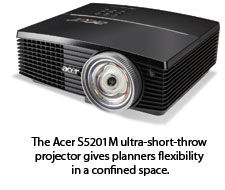 Acer S5201M Projector
7.7 lbs., $999 While the Acer wasn't the most travel-friendly projector we tested, it was by far the most flexible to set up in confined spaces. Do you have to present in a closet-size conference room? If so, this one's a good bet. That's because it's an ultra-short-throw projector, meaning it can project a large-screen presentation while positioned a minimal distance from the screen -- as little as 19.2 inches away. In fact, this Acer can provide a 77-inch (diagonal) image from just 37.4 inches away. Set it up alongside a normal-throw unit and you'll notice the difference immediately. We hooked the Acer up to a MacBook using a VGA adapter and had no issues getting it up and running.
The projector ships with the Acer SmartPen, a fun and incredibly useful interactive gadget. You can "write" on the presentation during meetings, perhaps to underscore certain points or to add more information as you talk. Plus, the pen works from up to 32 feet away, which means attendees can just as easily use the tool to add their own feedback or ideas. An especially cool feature allows for these notes to be saved to the presentation and uploaded to a website.
The SmartPen doubles as a remote mouse, so the presenter can use it to scroll through presentations or advance slides in traditional fashion.
Image quality was excellent, and in our use this unit was the best of the bunch in video playback. The projector offers brightness of up to 3,000 lumens, and has native XGA resolution (with the same aspect ratio, or display shape, as most digital cameras). That can be adjusted to different resolutions and aspect ratios to match wide-screen displays.
You can hook up this projector to a local-area network as is, or control it via Wi-Fi with an optional attachment. Or you can bypass a computer altogether and run a PowerPoint presentation right off of a USB drive -- but only after first converting that presentation using Windows-only software that ships with the projector.
Lamp life estimates are for up to 4,000 hours of use, and a special EcoProjection setting reduces your electric bill and environmental impact: With it, you can reduce power consumption in standby mode by up to 80 percent and reduce the brightness to 2,400 lumens if you don't require the full power.

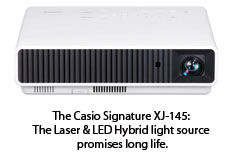 Casio Signature XJ-M145 Projector
8.6 lbs., $1,199.99
Casio's Signature line is powered by a different technology than the
traditional mercury lamp. They call it the Laser & LED Hybrid light
source, and that essentially combines laser and fluorescent light
sources that are projected through a Digital Light Processing chip. What
does that mean to you? It results in a projector that reaches maximum
brightness in 8 seconds and doesn't need to cool down after use. Plus,
the absence of a mercury bulb in the design results in a 20,000-hour
estimated operating life and a potential savings, according to Casio, of
about $800 after 6,000 hours of use.
We found the XJ-M145 to
produce pleasing image and video quality, and we liked the enhanced
connectivity options. Specifically, being able to connect up to four
laptops at once via Wi-Fi presents interesting collaboration
possibilities.
Note that the required Wireless Connection 3
software is Windows-only, though, and that initial wireless setup was a
bit confusing. Once installed, however, the wireless projection process
is a handy alternative to cables.
Speaking of which, this
projector also ships with MobiShow, which allows presentations to be
done over a Wi-Fi network, directly from a mobile device -- be it
iPhone, iPad, Android or Windows Mobile. We love that concept, but it
was a bit confusing when it came to setup. Planners will have to check
out an online user's guide that explains the process of downloading a
MobiShow app, uploading a converted PowerPoint presentation and
wirelessly connecting to the projector.
Like the Wireless
Connection software, MobiShow isn't Mac-friendly. So, yes, you can use
Apple's mobile devices -- but only if the PowerPoint file is first
converted to the MobiShow format using software that can only be run by a
Windows computer and then e-mailed to the Apple mobile device. If
you're in a Windows-based corporate environment, that shouldn't be much
of an issue; but it limits the ability of some presenters to prepare
their files ahead of time.
When it comes to old-fashioned wires
and cables, though, the platform doesn't make a difference -- we hooked
up a MacBook with a VGA adapter and had no issues. Like the Acer
projector, the Casio has a native XGA resolution that can be adjusted to
match other formats. The brightness (2,500 lumens) also was in line
with what you would need in most meeting situations.
 Epson EX7200 Multimedia Projector
5.1 lbs., $650
Epson's submission is tailored more to general and small-business use
than the others, and lacks network or wireless connectivity options.
That said, it is the lightest and sleekest of the bunch, and we found it
the easiest to use.
This projector does offer the most
straightforward connection choice, which is to just plug and play via a
USB cable, to either Mac or Windows computers. So there's no need for
VGA display ports or adapters once you install the included software.
We
liked the precise control layout as well: The buttons on top of the
machine are minimal, clear and larger than those on the others, and the
lens is flush and hidden away with a sliding piece of plastic,
eliminating the need for a lens cap.
This projector's native
resolution is WXGA, or 1280 x 800, which matches the display of
wide-screen laptops. The 3-LCD chip technology (vs. the single DLP chip
of the others) provides pleasing image quality and color rendition, in
the same league as the other two projectors. When connected via VGA,
video playback is on par with the others, though it tends to get choppy
when hooked up by USB. Epson includes a VGA cable with the projector,
should that be an issue. The 2,600-lumen brightness should suffice for
most meetings.
Like the other projectors we tested, the Epson
EX7200 can project images directly from a USB drive. Unlike the others,
however, this will work only with a slide show of JPEG images -- not
with a PowerPoint presentation. That makes this a limited feature for
planners and is indicative of this unit's somewhat less businesslike
demeanor.
This projector uses what Epson calls an
"energy-efficient" E-TORL lamp, which is rated for a strong 5,000 hours
of use. The projector's triple-LCD chip approach, according to the
manufacturer, uses 25 percent less energy than a typical DLP chip.