Many planners are drawn to the high-tech allure of hybrid events, mobile apps or even video production, but they just can't squeeze any more out of their budgets. Fortunately for those cash-strapped dreamers, the technology doesn't have to be expensive to work. On the contrary, low-cost solutions make it easier than ever before to get great results from little investment. Glean inspiration from the following success stories.
Hybrid Events Scott Lum's team at Microsoft is responsible for organizing hundreds of customer meetings every year -- as many as four per week. Over the past year, Lum has turned the majority of those meetings into hybrid events -- and he added the online component with very little additional investment. "You can make very significant cuts to get your incremental costs down to the minimum," explains the digital marketing manager for events at the Redmond, Wash.-based firm.
Lum has strived to reduce incremental costs, and as a result he developed an economical, flexible solution that requires spending very little to stream each meeting online. The extra reach provided by putting the content online -- and keeping it there for on-demand streaming -- equates to a major return on the meager investment. Here's how he made it work.
• Determine acceptable quality. The first step, says Lum, is to recognize that hybrid events can encompass a whole spectrum of experiences for attendees. For instance, the general public has fairly lofty expectations for a high-profile Microsoft event, and that requires the appropriate investment -- "cameramen, satellite trucks, production costs in the six figures," notes Lum. But he needed to scale an affordable hybrid approach across hundreds of small, lower-profile events per year. "We wanted to create a regular cadence of cost-effective, rich media content that resonates with our audience," says Lum.
The nature of Lum's attendees determined his approach. "For my audience, which is IT pros and developers, seeing the most glitzy studio content is not necessarily what appeals to them. In fact, it might turn them off," he says. "The key is to understand the production quality that will resonate best with your target audience and create a spectrum of content that works best for them."
• Experiment with equipment. Lum attended a session several years ago that the presenter streamed on the spot, using only an iPhone and the free Ustream app. The speaker broadcast his talk, live, via the Ustream site online, and it was decidedly low-tech. But it got Lum thinking. "Basically, I realized you can create a hybrid event at almost no cost, using the production quality of a cell phone," he says. "That's awesome."
So Lum worked his way up the ladder of camera possibilities, and he settled on a basic HD digital video camera and a tripod to provide the acceptable level of quality for his audience. For the smaller meetings, he uses a roundtable camera, which rotates according to whomever is talking.
The meetings already had a basic A/V setup on-site -- specifically, an audio amplification system for the speaker microphone and a laptop and projector for PowerPoint presentations. The on-site A/V technicians -- already in the budget -- assist with the direct audio and presentation feeds for the live stream.
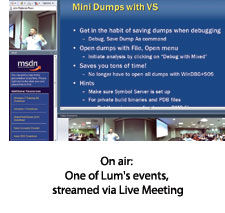 • Make the most of what you already have. Lum avoids significant production costs associated with hybrid meetings by treating these events as webcasts. Working for a tech company has its advantages in this respect: Lum uses Microsoft Live Meeting or Lync to stream the meeting, and incurs little cost in doing so.
Planners should find out what telecommunications tools already are being licensed by their companies, Lum suggests. For instance, WebEx, ON24, INXPO and the like offer webcasting tools that allow live streaming of a meeting. If the company already is a customer of the platform, the per-webcast cost is likely to be relatively inexpensive -- as low as $100 to $200 for regular INXPO clients doing a self-service production, or $450 for ON24's self-service Webcast Pro. (Check with the suppliers for specific prices, as many variables are involved.)
• Find the right venue. Lum's meetings typically take place in conference centers or hotels -- or, occasionally, in a movie theater. "The key thing that we look for when we determine whether or not the facility is good enough is the Internet connectivity," Lum explains. "A T1 line is ideal. Dedicated Wi-Fi, where other people can't access the network, is the bare minimum. We've tried it with 3G and 4G; the quality is just too spotty."
• Make it easy and repeatable. Perhaps the most important part of Lum's approach is the simplicity and portability of the setup -- what he calls his "hybrid event in a box." The equipment required is, literally, shipped around the country in its own compact box.
"Include the instructions, the camera, the tripod and any equipment you need to hook the camera into the meeting's audiovisual system, and ship that to the event site," advises Lum. "That way you don't incur any T&E costs for cameramen and a team to travel there. The in-person event generally has an A/V crew at the event itself. They set up the presentation, they set up a box in the back of the room for the audio and video from the presentation. That A/V team will just take the stuff from the event kit and basically plug it into the equipment in the back and set up the camera. Then from our end, we just treat it as a webcast."
Lum's sole additional labor cost is a tech point person who manages the stream and the production from headquarters. "He makes sure we have the right hardware, and he sets up meetings with the on-site A/V crew to make sure they know how to set things up," says Lum. "During the event itself, he manages the stream and ensures everything is running smoothly."
Easy Apps A customized event mobile app can
run north of $20,000 -- which may be offset or even exceeded by
sponsorship revenue -- but not every event requires the level of
customization typically responsible for that cost.
A number of
event app providers -- e.g., Bloodhound, Guidebook and Twoppy -- offer
low-cost or free versions. In most cases, planners upload their event
content into a standard template provided by such a developer; the
do-it-yourself nature of this approach, combined with the lack of
additional programming required of highly customized apps, keeps costs
low.
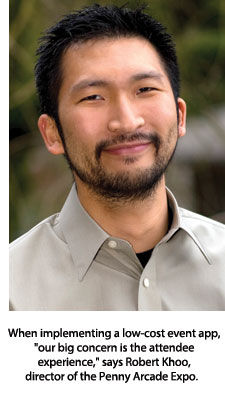 • Get something people will use. Can low-cost event
apps handle the requirements of big shows? Absolutely, says Robert Khoo,
director of the consumer gaming Penny Arcade Expo. He's used Guidebook
for a handful of shows that have attracted as many as 70,000 attendees.
"Honestly," he says, "our big concern is the attendee experience. Sure,
for them the guide is free, but that's no excuse for the product to
suck. And we've had apps that were not Guidebook that have straight-up
sucked. The app would crash, it would have bugs, it didn't scale to the
number of people we needed it to, it would be missing features -- there
were all sorts of problems."
• Get something people will use. Can low-cost event
apps handle the requirements of big shows? Absolutely, says Robert Khoo,
director of the consumer gaming Penny Arcade Expo. He's used Guidebook
for a handful of shows that have attracted as many as 70,000 attendees.
"Honestly," he says, "our big concern is the attendee experience. Sure,
for them the guide is free, but that's no excuse for the product to
suck. And we've had apps that were not Guidebook that have straight-up
sucked. The app would crash, it would have bugs, it didn't scale to the
number of people we needed it to, it would be missing features -- there
were all sorts of problems."
Guidebook, meanwhile, has proved a
robust and flexible mobile tool Khoo will happily keep using. Typically,
about 20 to 40 percent of the show's attendees have used the app, a
number he's pleased with for such a large consumer event.
• Pay for what you need.
Some low-cost app developers offer a tiered pricing structure, catering
to no-budget planners as well as those who need a somewhat more robust
solution.
The Palo Alto, Calif.-based Guidebook offers three
such tiers: Standard (free), Plus ($1,750) and Premium ($5,000). The
first two options require customers to construct the app themselves
using Guidebook Gears, a web interface with straightforward data
importing, drag-and-drop functionality and graphic customization
options. The Standard level allows for up to 200 guide downloads and
offers additional features that include a schedule, maps, customizable
reminders and reports. The Plus package, which allows for up to 2,000
downloads, adds social media integration and in-app attendee feedback to
the mix, as well as more customization options. With the
top-of-the-line Premium version, Guidebook builds the app and allows
unlimited guide downloads. That package includes in-app sponsorships and
unlimited customization.
About 75 percent of Guidebook's clients
opt for the free version, according to a spokesperson, while clients
such as Khoo, who handles very large events, pay for the Premium
package. "We absolutely feel the cost is worth the value it provides to
the attendees," Khoo says.
• Keep it simple. A
do-it-yourself app shouldn't be complicated. Martha Pennington, the
Fayetteville, Ga.-based meetings and exhibitions manager for the
National Ornamental & Miscellaneous Metals Association, didn't find
the Twoppy app until four weeks before her 400-attendee event. "I was
able to set it up quickly and with minimal challenges," she says about
the app's free version. "I looked at some other options where I had to
create an Excel sheet -- a lot of extra work. With Twoppy I was able to
cut and paste from existing programs."
Making quick changes to
the app is equally important, notes Lori Roberts, who used the free
version of Twoppy for the 3,000-attendee Business Professionals of
America State Leadership Conference. "One of the biggest strengths for
us was the ability to update on the fly," explains Roberts, the area
representative and board secretary for the BPA Texas Association. Her
team was able to quickly upload competition results into the app. "It
was one of the things we got the most feedback about," she notes.
Online Extra
Go to
mcmag.com/webexclusives for a slide show featuring innovative event apps mentioned in this article, as well as a video demonstration of the iRig mic.
DIY Videos Video is a powerful medium, with the capacity to grab the attention of
attendees. When Gina Schreck and Neen James co-chaired the National
Speakers Association "Unconference" last year, they regularly posted
informational videos in the weeks leading up to the event. "We
communicated everything in multiple channels," says the Denver-based
Schreck, a social media marketing expert and the president of
SynapseConnecting. "And we found that more people watched the videos
than read e-mails. If you put out short videos on a regular basis --
say, a tip for the week -- people love them. And it was free to
produce."
Video is a powerful medium, with the capacity to grab the attention of
attendees. When Gina Schreck and Neen James co-chaired the National
Speakers Association "Unconference" last year, they regularly posted
informational videos in the weeks leading up to the event. "We
communicated everything in multiple channels," says the Denver-based
Schreck, a social media marketing expert and the president of
SynapseConnecting. "And we found that more people watched the videos
than read e-mails. If you put out short videos on a regular basis --
say, a tip for the week -- people love them. And it was free to
produce."
• Make it simple and direct. Interestingly,
Schreck's experience mirrors that of Microsoft's Scott Lum: It isn't
just IT pros who can be turned off by something that's too slick and
glossy.
"When a video promoting an event is overproduced, it's
seen differently," Schreck explains. "It's not just a casual message
coming from the team that's trying to get you excited about the event.
You start picking it apart." And from Schreck's perspective, "I usually
look at it and think, I can't believe they're spending money on that."
• Start with the technology you already have.
The quality of integrated webcams, as well as the cameras built-in to
smartphones and tablets, has improved dramatically over the last several
years. While it won't suffice for every purpose, it might be adequate
in many cases, including for social media marketing. Experiment with it,
advises Schreck.
• Use free tools. A common excuse
Schreck hears -- "I don't know how to get the video off of my camera" --
is easily addressed. "Just go to YouTube directly," she says. "Start a
channel for the company or for the specific event -- I like to create an
event channel -- and record a video directly through YouTube. People
don't realize you can do that."
Once signed into the account,
click "Upload," followed by "Record from webcam." Even better, adds
Schreck, YouTube allows for basic editing functionality. "Maybe in the
beginning of the take you were kind of fumbling, or you might have been
looking at the screen weirdly at the end when you were trying to find
the stop button. You can just trim the ends right there in YouTube."
Not
only can the ends by trimmed, the "Enhancements" tab that appears after
uploading the video allows for additional editing functions such as
cutting together clips, adding transitions, fixing color and adding
music. It's all free and requires nothing more than YouTube and a
webcam-equipped computer.
• Focus on sound. Keep in mind
that audio quality can be a deal-breaker. "People won't tolerate a video
where they can't hear things," says Schreck. While it might be fairly
easy to control background noise at home when recording with a webcam,
shooting on location can be far more of a challenge, especially if
you're using a mobile device such as an iPhone or iPad to make a video
on-site.
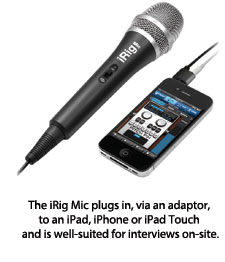 Spend a little extra to get an external microphone,
advises Schreck, who uses the iRig Mic, a handheld microphone that plugs
in, via an adapter, to the iPad, iPhone or iPod touch ($59.99; ikmultimedia.com/products/irigmic). The mic is well-suited for
interviews on-site. (See our video review of the iRig Mic at
mcmag.com/videos.) Schreck uses an inexpensive lapel microphone (about
$15) along with an adapter for the iPhone or iPad (about $20) for videos
she's narrating herself.
Spend a little extra to get an external microphone,
advises Schreck, who uses the iRig Mic, a handheld microphone that plugs
in, via an adapter, to the iPad, iPhone or iPod touch ($59.99; ikmultimedia.com/products/irigmic). The mic is well-suited for
interviews on-site. (See our video review of the iRig Mic at
mcmag.com/videos.) Schreck uses an inexpensive lapel microphone (about
$15) along with an adapter for the iPhone or iPad (about $20) for videos
she's narrating herself.
• Go mobile. What's really cool
about using the iPad to make videos is that with Apple's iMovie app
($4.99; Apple App Store), full production on the iPad is possible. "It's
not hard," Schreck promises, "but you have to get over that initial
fear. After you do it one time, you realize it's really simple. You can
create the whole video right on your iPad, without having to send or
transfer the file anywhere." When the video is ready, publishing
directly to YouTube, Facebook or Vimeo is easy. Just note whether any
music is copyrighted or in the public domain.
4 Free Apps
Following are four free general mobile apps that can be put to good use for increasing engagement or helping to market events.
 GooseChase
(for Apple iOS and Android). A fun, easy-to-use scavenger hunt creator,
GooseChase automatically tallies points for participating teams. "This
was one of the apps used at the American Society for Training and
Development conference in May in Denver," says Gina Schreck, president
of SynapseConnecting. "They had 10,000 people at that event. The app put
participating attendees into teams, and then each team would meet up
and had two days to complete this list. Because the app automatically
tallies scores, there wasn't much manual work for the event coordinator.
It was very well received. People loved playing it, and they learned a
lot because the tasks that were set up had to do with things they had to
learn while they were there."
GooseChase
(for Apple iOS and Android). A fun, easy-to-use scavenger hunt creator,
GooseChase automatically tallies points for participating teams. "This
was one of the apps used at the American Society for Training and
Development conference in May in Denver," says Gina Schreck, president
of SynapseConnecting. "They had 10,000 people at that event. The app put
participating attendees into teams, and then each team would meet up
and had two days to complete this list. Because the app automatically
tallies scores, there wasn't much manual work for the event coordinator.
It was very well received. People loved playing it, and they learned a
lot because the tasks that were set up had to do with things they had to
learn while they were there."
 Storify (for iPad). This app helps
construct a story about a specific theme or event by scouring social
networks for articles, photos, videos and the like. It can be used to
glean content for a show daily, albeit an online, multimedia version of
one, and it can be distributed via social media. (It works online at
storify.com as well as via the iPad app.)
Storify (for iPad). This app helps
construct a story about a specific theme or event by scouring social
networks for articles, photos, videos and the like. It can be used to
glean content for a show daily, albeit an online, multimedia version of
one, and it can be distributed via social media. (It works online at
storify.com as well as via the iPad app.)
 Foursquare (for
Apple iOS or Android) has become the go-to geolocation social media app,
and that makes it even more appealing for event organizers -- there's
no need to explain a lot to attendees. Foursquare can be particularly
useful in exhibit halls, explains Gina Schreck. "At the event itself, we
like the idea of helping the vendors get more exposure. You can have
each booth be a check-in on Foursquare. You can then make kind of a
game, where participants go to each booth and check in, and then they
have to share some piece of information about that vendor on Foursquare.
You can give prizes for the most check-ins -- and you're able to see
that because Foursquare pulls up all that info."
Foursquare (for
Apple iOS or Android) has become the go-to geolocation social media app,
and that makes it even more appealing for event organizers -- there's
no need to explain a lot to attendees. Foursquare can be particularly
useful in exhibit halls, explains Gina Schreck. "At the event itself, we
like the idea of helping the vendors get more exposure. You can have
each booth be a check-in on Foursquare. You can then make kind of a
game, where participants go to each booth and check in, and then they
have to share some piece of information about that vendor on Foursquare.
You can give prizes for the most check-ins -- and you're able to see
that because Foursquare pulls up all that info."
To increase
participation, Schreck recommends brief videos -- one explaining to
attendees which social media channels will be used at the event, and one
how-to video for exhibitors. "That way, it's up to the exhibitors -- if
they want to entice more people to come to their booths, here's a great
way to do it, and here's how to make your booth a check-in location."
 Instagram
(for Apple iOS and Android), an innovative app for taking and sharing
photos, already has a huge following, which is quickly growing since
Facebook acquired the company. The fact that a lot of people already are
using the app makes the event organizer's job easier. Publicize an
event-specific hashtag to use on all photos so they're easy to find
online, and you can dramatically increase the visual coverage of the
show, seen through the eyes of the attendees. With Instagram's artfully
applied filters, the event's image becomes instantly hipper.
Instagram
(for Apple iOS and Android), an innovative app for taking and sharing
photos, already has a huge following, which is quickly growing since
Facebook acquired the company. The fact that a lot of people already are
using the app makes the event organizer's job easier. Publicize an
event-specific hashtag to use on all photos so they're easy to find
online, and you can dramatically increase the visual coverage of the
show, seen through the eyes of the attendees. With Instagram's artfully
applied filters, the event's image becomes instantly hipper.